Get Yacht Clubs Manager running at your club. Book a 20-minute walkthrough.
Your club has given you a duty: race officer on a Sunday, safety boat on a Wednesday evening, or a shift behind the bar at the prizegiving. Most of the time you just turn up. But plans change, and when they do you need a straightforward way of swapping a sailing club duty with someone else without a chain of emails to the duty secretary.
This guide explains where to find your duties, which emails you will receive and when, and exactly how a swap works from both sides.
Where to find your duties
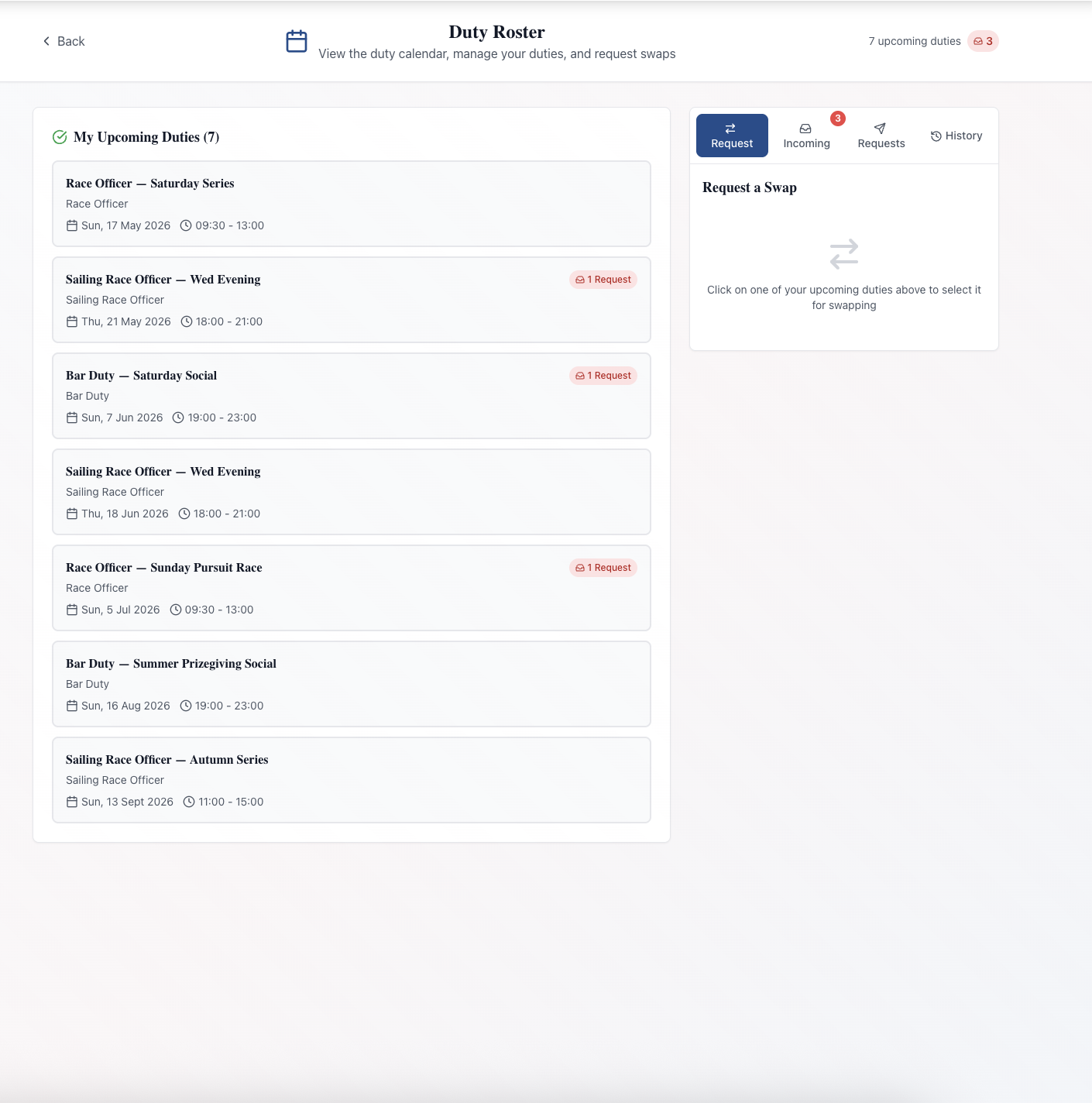
Sign in to the members area and open the Duty Roster. At the top you will see how many upcoming duties you have, and a red badge if another member has asked to swap with you.
The page has two tabs:
- My Duties lists your upcoming duties. Each one shows the title, the duty type, the date and times, who else is on duty with you, and any description the club has added. Once a duty has finished it drops off the list.
- Calendar shows the whole club's duties one month at a time. Click a day to see who is on duty, doing what, and when. It is useful for spotting someone to swap with.
There is nothing you need to click to accept a duty. If it is on your list, the club is expecting you. If you cannot do it, arrange a swap using the steps below, or speak to whoever runs the roster.
The emails you will receive
When you are given a duty, you receive an email with the subject "Duty Assignment" followed by the duty's title. It includes the role, date, time, location and any notes, with a button to view your duties.
Before the duty, you receive reminders 14 days, 7 days and 24 hours before it starts. Each one says how many days away the duty is, repeats the details and lists who else is on duty that day, which is handy if you want to coordinate or arrange a lift.
If the club changes or removes your duty, you receive an email telling you what has changed.
You will also see these as notifications in the members area, so nothing is lost if an email ends up in your spam folder.
Swapping a sailing club duty, step by step
A swap is a trade: you take one of another member's duties, and they take yours. You cannot simply hand a duty over to someone. That keeps the roster balanced and means nobody finds they have an extra duty they did not agree to.
- On My Duties, click the duty you want to swap. The swap panel opens on the Request tab.
- Under Select a duty to swap with, pick another member's upcoming duty of the same type from the calendar. Duties you can swap with are highlighted in green.
- Add a short message if you like, up to 250 characters. Something like "Away with work that weekend, happy to take your July slot" helps the other member say yes.
- Press Send Request, check the summary, and press Confirm & Send.
Your duty now shows a "Pending Swap" badge, and the request appears on the Requests tab. You can cancel it from there with Cancel Requestat any time while it is still pending; the other member is told by email.
What you can and cannot swap
The roster checks each request so a swap never leaves a gap or a clash:
- Both duties must be of the same duty type, such as race officer for race officer.
- Neither duty can start within the next 24 hours. Those duties show "No Swaps".
- You cannot take a duty on a day when you already have one, or one that clashes with your other duties.
- Each of your duties can have one swap request out at a time.
- You can have up to five pending requests in total.
If the swap you want is not allowed, or it is inside the 24-hour window, contact the person who manages the roster. They can reassign duties from the admin side.
What the other member sees
The member you asked receives an email headed "Duty Swap Request from" followed by your name. It sets out which of their duties you want and which of yours they would get, includes your message, and links to the roster. In the members area, the Incoming tab shows the request with both duties side by side and two buttons: Accept and Reject.
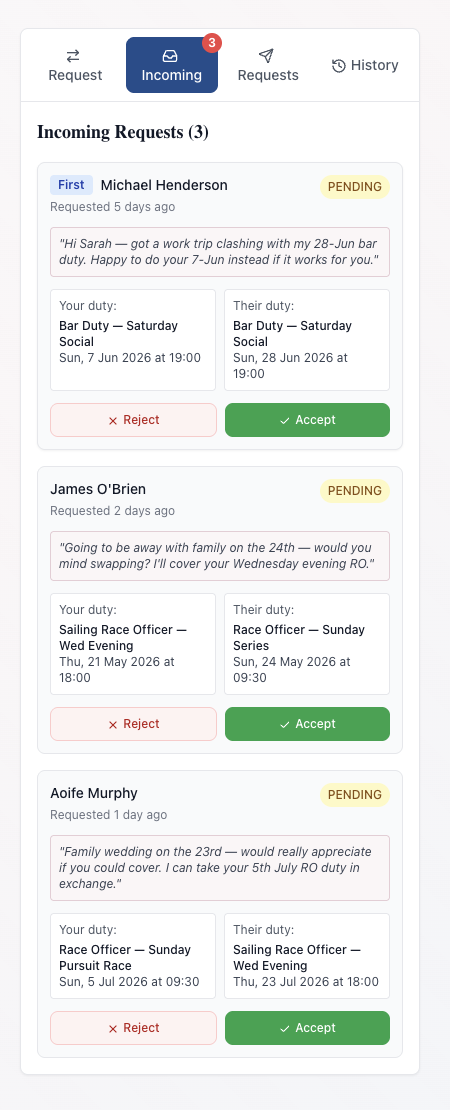
If they accept, they are shown what they will give up and what they will receive, then confirm. The swap goes through straight away, with no need for anyone on the committee to approve it. Both duties are reassigned, the roster updates for everyone, and you both receive a "Duty Swap Completed" email. From then on, reminders for the new duties go to the right people. Any other pending requests for those duties are cancelled automatically, and the members concerned are told.
If they reject it, they can add a reason. You receive a "Duty Swap Declined" email including that reason, and your original duty stays with you. Try someone else.
When nobody replies
A swap request does not sit there forever. If it has not been answered after a couple of days, both of you receive a reminder that it will expire. If there is still no answer after 7 days, the request expires and both of you are emailed. You keep your original duty, so if you still need a swap, send a new request, perhaps to someone else.
A pending request also expires if either duty comes within 24 hours of starting, so the roster is settled before the day.
The History tab keeps a record of your past requests, with any notes and responses.
Turning duty emails off
If you would rather check the roster yourself, open Notification Settings from the menu in the members area. Under Email Preferences, switch off Duty Emails and press Save Changes. Every duty email in the footer also links to this page.
That one switch covers all duty emails: new assignments, changes and removals, the 14-day, 7-day and 24-hour reminders, and swap requests and replies. Be aware that it also stops the matching notifications in the members area, so you will need to check the Duty Roster page yourself, including the Incoming tab for swap requests. Security emails, such as password resets, are always sent.
Common questions
Does my partner get their own duty emails? Your club account is a household account with one login, so duty emails go to the email address on the account. Family members are recorded on your profile rather than having separate logins.
Does the duty secretary know about my swap? Yes, in the sense that the roster they work from updates immediately. They do not need to approve it or do anything.
Can someone who is not a member do a duty? The club can put a non-member on the roster, and they receive emails if the club has their address, but they cannot take part in swaps.
For the committee
If you run the roster rather than just appear on it, read how to run a sailing club duty roster for creating duties, duty types and exports. For members new to the site, start with joining your club online and keeping your club profile up to date. The full picture is on the duty roster feature page.
Like the read? See it running with your club's data — book a demo.