Get Yacht Clubs Manager running at your club. Book a 20-minute walkthrough.
Ask a committee how the club is run and you'll usually hear a list: a website someone built years ago, a membership spreadsheet, invoices done in a word processor or an accounts package, a duty rota pinned to the noticeboard, a mailing list tool, a form for event entries, and perhaps a separate arrangement for selling burgees. Each one made sense when it arrived. Together they mean the same member's details are typed in four places, and every handover comes with a folder of logins.
Moving your club onto one platform is less about the software and more about what changes for the people doing the work. This piece walks through what Yacht Clubs Manager takes over and, role by role, what is different for your committee afterwards.
What one platform actually replaces
Yacht Clubs Manager has three parts that share the same records: a public club website, a members area, and an admin console for the committee. Between them, they cover:
- Your website and news: news stories with photos and categories, a gallery, an events calendar, a results page, sponsors, and your committee page.
- Membership records and applications: an online application form your club designs, and member profiles with family members, emergency contacts, qualifications and boats.
- Invoicing and renewals: invoices with card payment through your club's own Stripe account, reminders, and renewal settings you can automate as far as you choose.
- Events and entries: event pages with the Notice of Race and Sailing Instructions, and online entry with fees.
- Duty rosters: duties, reminders and member-to-member swaps.
- Email and newsletters: newsletters built from your own news and notices, and one-off emails to members.
- A club shop: click-and-collect merchandise with card payment.
Some parts, such as online event entry, the shop, a member forum and bookable resources like a crane or club boats, are options your club switches on when it is ready. You don't have to move everything at once.
For the commodore and honorary secretary
The biggest change is that you can see what is going on without asking five people. The admin dashboard shows a to-do list: applications waiting for a decision, overdue invoices, bookings awaiting approval, noticeboard posts to moderate and paid shop orders to hand over.
You also decide who can do what. Instead of sharing one password, individual members can be given specific admin permissions, such as news, events, the duty roster, viewing the member list, invoices, the shop or settings, or full access where that's genuinely needed. When a committee member stands down, you remove their access and the records stay where they are.
For the membership secretary
Applications arrive through a form on your website that you design: the built-in fields, a proposer and seconder, and your own questions, including file uploads. The committee is emailed when one comes in. You accept or decline in the admin console; accepting sends the applicant an invitation to set up their account and fill in their own details.
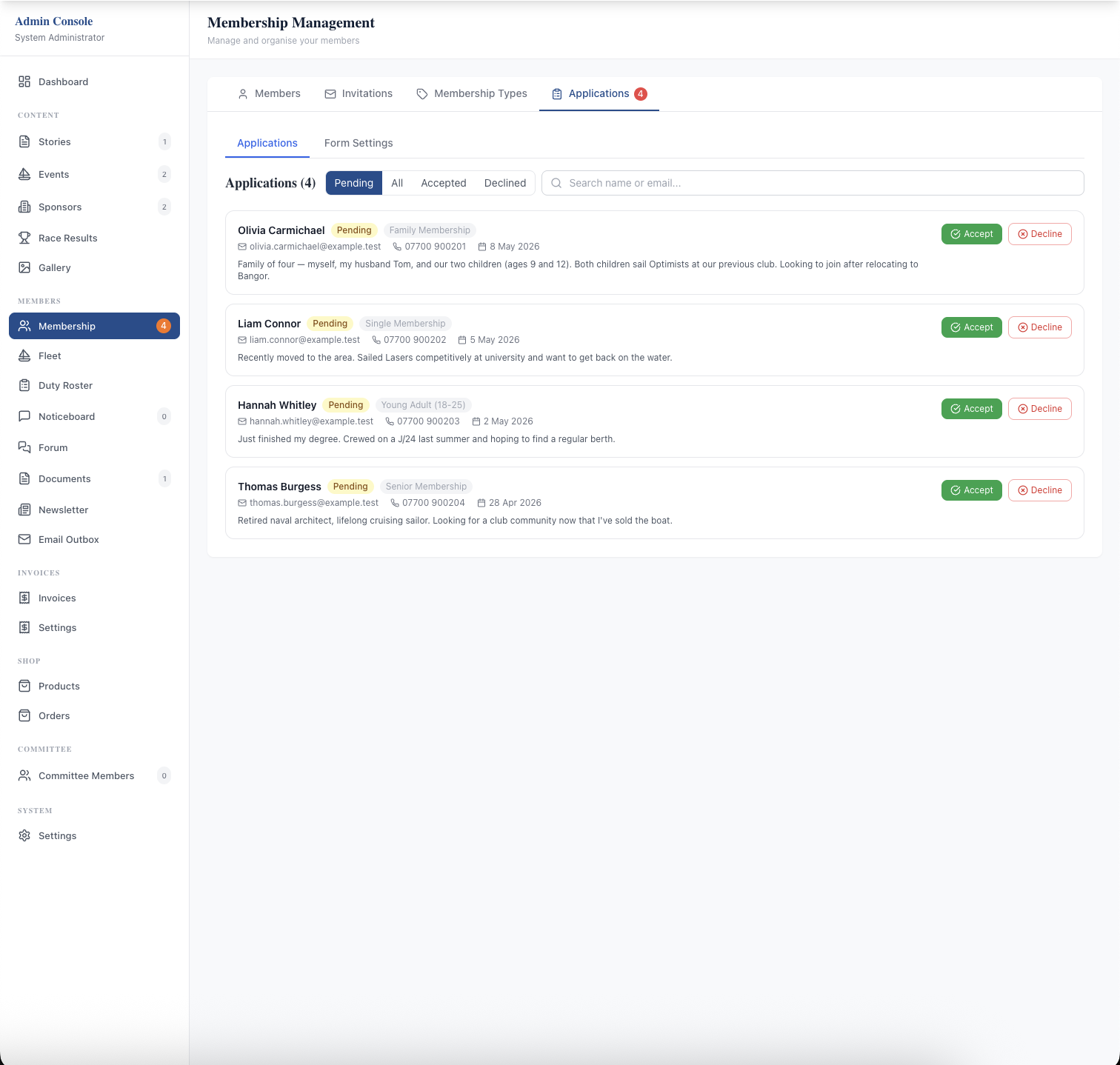
That last part is what changes the job. Members keep their own contact details, family members, emergency contacts, qualifications and boats up to date, so you're no longer the one retyping a change of address. Existing members come in from a simple spreadsheet invitation, and each then completes their own profile.
For the treasurer
Invoices are created in the same place the member records live, so there is no exporting a list to raise bills. Members see their invoices in the members area, download PDFs and pay by card. The money goes directly to your club's own Stripe account. Members who pay by bank transfer can tell you they've paid with one button, and you record it.
Reminders before and after the due date can go out automatically. Renewals can be as manual or automatic as your club wants: drafting next year's invoices, sending them on the renewal date and deactivating unpaid members are each separate choices, all off until you turn them on. For reporting, there is a yearly overview, income by revenue category, and CSV or Excel exports, and clubs using Xero can connect it. The renewal checklist walks through renewal season step by step.
For the sailing or events secretary
Each event gets a page on your website with the Notice of Race, Sailing Instructions and any other documents attached, so competitors always see the current version. When you switch on online entry, people enter from that page, with fee tiers, capacity limits and per-day entry for multi-day events, and pay by card as they enter. You manage entries, cancellations and refunds in the admin console, and export the entry list as a PDF.
After racing, you score as you do now and publish the results as a link or a PDF on the club's Results page, so nobody has to wait for the webmaster.
For the duty co-ordinator
You still decide who does which duty; the platform doesn't pick people for you. What changes is everything after that. Members are emailed when they're given a duty and reminded 14 days, 7 days and 24 hours beforehand. If they can't make it, they arrange a swap with another member directly, and the roster updates when the other member accepts. See how to run a sailing club duty roster.
For whoever does communications and the website
News goes on the website from the admin console, with photos and categories, and without needing a web developer. A newsletter is then built from what you have already published: pick the news stories, noticeboard posts and documents to include, add a subject and an introduction, and send it to all active members or to chosen members. Members who have opted out of club communications are skipped automatically. An email outbox shows what went out and to whom, including anything that bounced.
For the shop volunteer
If your club turns on the shop, products with sizes, colours and personalisation go on the website, anyone can buy without logging in, and orders move from paid to ready for collection to collected, with the customer emailed when their order is ready.
For your members
One login. Their invoices, duties, documents, noticeboard and bookings are in one members area, with badges showing what's new since their last visit. They can update their own details, choose which emails they get, download their data or ask to delete their account, without needing to email the secretary.
How the move happens
You don't set it up alone. The Yacht Clubs Manager team sets up your club's site, with your branding, domain and email sending. Your committee then configures the rest in the admin console: membership types, the application form, invoice and renewal settings, the Stripe connection, duty types and content. Existing members are invited from a spreadsheet with three columns: first name, last name and email. Your first 30 days sets out the order most clubs follow.
If your committee is weighing up the move, start with the full list of features, look at member management in more depth, or see how setup and pricing work.
Like the read? See it running with your club's data — book a demo.